
GOOGLE NONSENSE LABORATORY
Designing Exploratory Interfaces for Machine Learning Systems
SUMMARY
A SET OF TOOLS THAT MANIPULATE LANGUAGE WITH MACHINE LEARNING
I designed a set of interactive tools that make machine learning–driven language transformations understandable, explorable, and engaging.
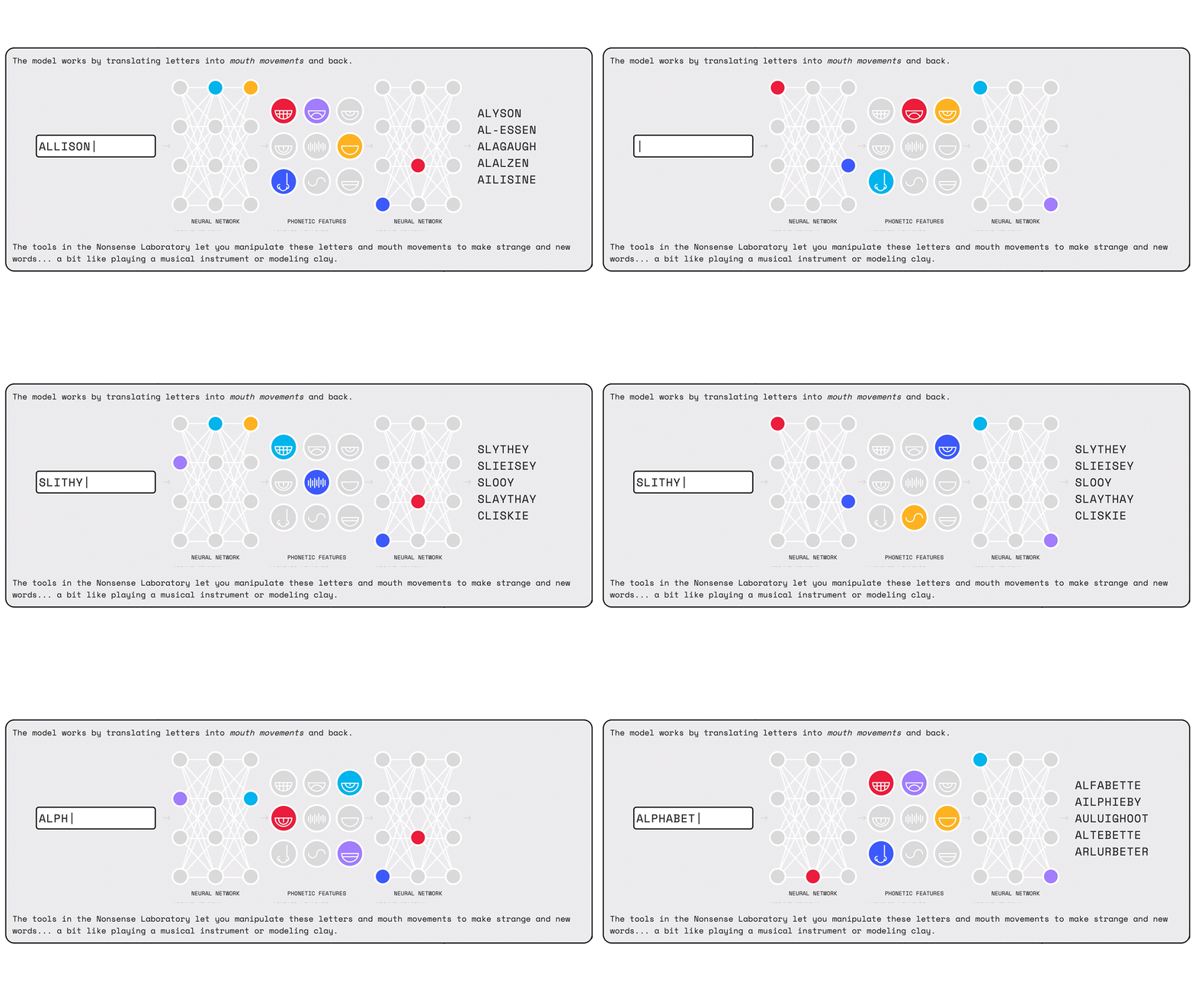
The system demonstrates the behavior of a pre-trained language model through a series of interactive interfaces, allowing users to manipulate inputs and observe how outputs change in real time. At the center is machine-learning model Pincelate, which is doing a two-way transformation behind-the-scenes:
-
It's turning letters from user inputs into phonemes (how a word sounds)
-
and turning phonemes back into letters (how to spell that sound)
The work focused on defining interaction patterns and visual structures that translate complex, opaque processes into intuitive, user-facing experiences.
PROJECT OR FILE
You can explore the tool on Google's Arts & culture website here.
TECHNICAL SNAPSHOT
System Type: Machine learning–driven language transformation (non-deterministic outputs)
Interaction Model: Real-time input → transformation → output loop
Challenge: Making opaque, probabilistic system behavior understandable through interface design
Engineering Consideration: Interfaces designed to accommodate unpredictable outputs and variable response states
THE CHALLENGE
CREATING CLEAR AND ENGAGING TOOLS OUT OF COMPLEXITY
Machine learning systems introduce a unique design challenge:
-
Outputs are non-deterministic and unpredictable
-
The underlying logic is opaque to most users
-
The system is pre-trained, meaning users explore behavior rather than define it
This creates a gap, because users can interact with the system, but may not understand why results change or how to meaningfully explore it.
The goal was to design interfaces that make these transformations legible and engaging without requiring any technical knowledge of machine learning.
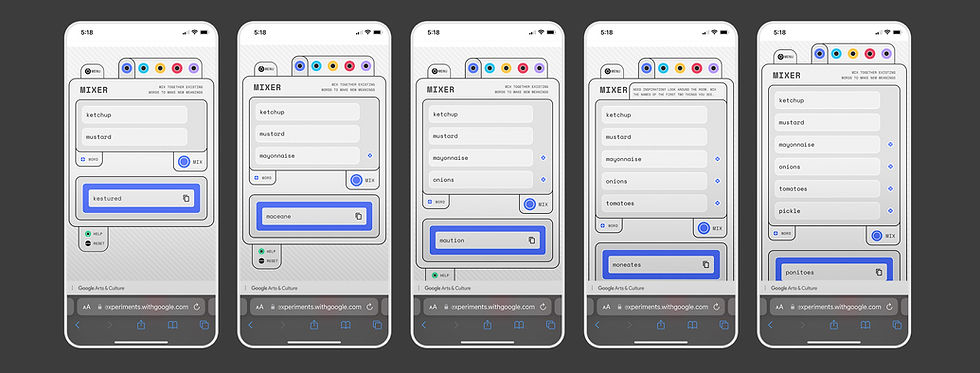
In the isolated use of one of the tools in the Nonsense Laboratory suite, the output is showing the user a word that "sounds like" a mixture of all the words that the user put in, driven by the Machine Learning model.
APPROACH
DESIGNING FOR EXPLORATION, NOT CONTROL
Because users are not training or configuring the model, the interface needed to support:
-
Exploration over precision
-
Understanding through interaction
-
Discovery through variation
In other words, the emphasis was on play, while perhaps inviting a deeper understanding of the tools through exploration. Rather than exposing technical controls, I focused on designing intuitive interaction patterns that encourage users to probe the system’s behavior.

DESIGN PRINCIPLES
PLANTING THE SEED FOR PLAYFULNESS
-
Legibility over explanation
Surface behavior through interaction rather than technical detail -
Immediate feedback
Show results instantly to reinforce cause-and-effect -
Consistency across tools
Maintain predictable interaction patterns despite varied outputs -
Play as a learning model
Encourage experimentation to build intuition

SYSTEM DESIGN
LOGICAL TOOL DIVISIONS + FLEXIBLE OUTPUTS
The experience was structured as a set of interconnected tools, each exposing different aspects of language transformation technology powering it.
-
Tool-based architecture
Organized functionality into distinct tools with clear purposes -
Shared interaction model
(Relatively) consistent input → transformation → output flow across tools -
Flexible output handling
Interfaces accommodate a wide range of generated results -
Seamless navigation
Users can move between tools without losing context
Early sketches helped shape the user interfaces and create tools that were distinct from one another in terms of functionality, but that followed the rules of the system.

INTERACTION PATTERNS
THE SET OF TOOLS
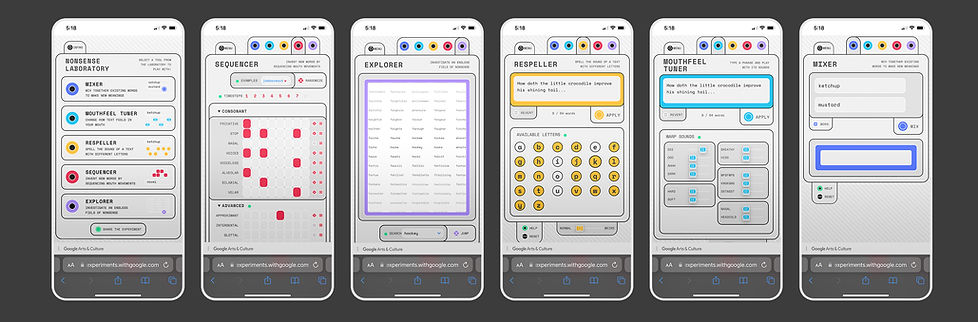
Each tool translates a complex transformation into a simple, manipulable interaction:
-
Mixer combines two or more existing words to create a nonsense word
-
Mouthfeel Tuner can manipulate a sentence by emphasizing phonetic sound characteristics
-
Respeller respells sentences as if they were spoken without using certain sounds or letters
-
Sequencer invents new words by sequencing specific mouth movements
-
Explorer Allows a user to scroll a word map of related nonsense words, with an existing non-nonsense word as a base
Across all tools, interactions follow the consistent model of:
input → transformation → output → iteration

ROLE
I led the design of the system, including:
-
Defining interaction patterns across tools
-
Structuring the system and relationships between tools
-
Designing user interfaces for each experience
-
Conducting research into linguistics and language behavior
-
Collaborating with engineering and project leads
IMPACT
-
Made machine learning–driven language transformations accessible and engaging
-
Enabled users to explore system behavior through direct manipulation
-
Established a cohesive interaction system across multiple tools
-
Demonstrated how complex technical systems can be understood through interface design
More Finished Designs


